
Herrington and Kervin discuss the principles of authentic learning with technology in the 2007 paper “Authentic learning supported by technology: Ten suggestions and cases of integration in classrooms.” The use of cases within the literature assists my visualisation and understanding of how I can implement these principles in my own teaching.
One principle that I can utilise to create an authentic digital experience for students is the expert performance. Expert performance is the opportunity for students to witness a task/procedure being demonstrated by a professional (for example a clinician), prior to it being practised independently by the candidate. Students’ of BSc Oral Health Sciences often echo Herrington and Kervin’s (2017) observation that it is;
“Much easier to learn a skill or concept when they see it demonstrated by an expert.” (Herrington, Kervin, 2007)
When students begin learning the process of tooth restoration, I have previously tried to demonstrate the technique using a mannequin situated in front of small groups. Visibility is lessened by using water from the high-speed drill and the limitations of the camera equipment. Students observing the demonstration may only be able to view the tooth clearly after a stage of restoration is completed. This diminishes the effectiveness the video demonstration as it fails to allow the student to see how the cavity preparation is achieved. Expert performance on a small group has been used to some degree but it has not been as successful without use of technology. Due to the confined nature of the working environment, an ideal location for recording equipment is mounting a camera on an overhead light with the ability to zoom in on the active working site. It is also important that the lecturer demonstrating can view what is being recorded on a screen. When carrying out dental procedures hands and equipment frequently obscure the direct view of the camera. Utilising a teaching screen allows the clinical demonstrator to adjust their position thus ensuring an uninterrupted view for students.
The creation of a well filmed video/vodcast would eliminate the visual difficulties that students are currently experiencing. The video would demonstrate the clinical procedure using a camera in a fixed position that would capture all movements by the “expert”(Herrington, Kervin, 2007). This vodcast/video would be posted to LEARN for students to watch prior to the practical skills session which would include a voice over description and rationale for actions and steps within the procedure. Students that utilise this resource will benefit from the opportunity to view the process in advance, thus allowing more ti
me to physically practice the skill without a significant proportion of the clinical skills session being used up by a lecture.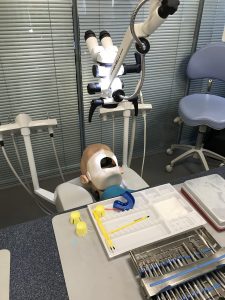
(Pictured is a mannequin that students practice skills on. A camera could be mounted on the microscope pictured above the head to allow uninterrupted filming of the procedure.)
After viewing the video, a question would be posted to promote student discussion of patient factors that may impact on the procedure. It is important that students can identify human variants and their impact on the process and how it is carried out. This is vital as variants such as saliva contamination cannot be emulated on a mannequin head but pose a significant issue that must be managed by the students when handling real patient cases.
Following the practical skills session students would have the opportunity to post photographs of practical work they have carried out on their mannequin and share within an online discussion board. In addition, students would also give feedback on the work of their peers. This would promote reflection, critical analysis and development of students’ abilities to recognise potential failings of restorations. In addition it would provide an opportunity to commend, encourage and support their peers.
UKPSF Dimensions covered – A1, A2, A3, A4, V1, K1, K2, and K4.
Reference List
HERRINGTON, J., KERVIN, L. (2007). Authentic learning supported by technology: Ten suggestions and cases of integration in classrooms. Educational Media International. 44(3). Pages 216-236. [online]. Available from: http://citeseerx.ist.psu.edu/viewdoc/download?doi=10.1.1.657.1044&rep=rep1&type=pdf [Accessed 18 Feb 2018]
Picture taken by Lucy Wands – Clinical Skills Room 1, 2nd Floor, Edinburgh Dental Institute.
Hi Lucy,
I agree that using tech to demonstrate practical aspects is really useful. We’re looking at recording Gram staining so that students can watch the video before the class, and again in the class.
With this part:
After the practical skills session students could share photographs on the discussion board of practical work they have carried out
I presume you mean on their own mannequins?
Best, Josh
Hi Josh,
Yeah that is what I meant. I’ll try and write it more clearly when I review the blog.
Many thanks
Lucy
Hello Lucy,
This sounds like a good example of an authentic learning experience for your students. I wonder if it could be enhanced further if the expert recorded a voice over for the video where they did ‘think aloud’ about their reasoning and plans for the procedure as they went along?
Best,
Velda
Hi Velda,
That is what I would propose to do, a voice over if you will whilst the clinical procedure is being carried out. When I review this blog I will be sure to make it more evident.
Many thanks
Lucy